
Automated Legal Workflows Added to Certera.AI to Streamline AI Comparisons

The Certera Legal AI Leaderboard ranks how AI models perform on legal work. It is based on votes cast by legal professionals who run a prompt, compare responses from different LLMs side by side, and pick the best one.
However, the rankings on an LLM Leaderboard are only as good as the prompts and outputs underlying them. An AI model that drafts a succinct, correct answer to a general legal question about case law may not be as good as identifying key facts and concepts from 200-page deposition transcript or accurately comparing and redlining a vendor agreement.
Truly distinguishing the quality of AI for legal requires prompting for tasks that lawyers and legal professionals actually perform. So, to make it easier for our users to run real legal workflows in Certera, and to better enable us to accurately benchmark LLMs on legal work, we are releasing pre-built workflows for common legal tasks.
What Is a Pre-Built Legal Workflow?
A legal workflow on Certera is a ready-made legal workflow automation (others might call it a legal AI skill). To utilize a workflow, users select from the Workflows dropdown menu and the prompt for the selected task is pre-filled into the chat box. Users can also add variables and upload documents relevant to the chosen workflow. In anonymous or custom mode, Certera will return two answers to the legal prompt so the user has more than one option and can choose the best one for the job.
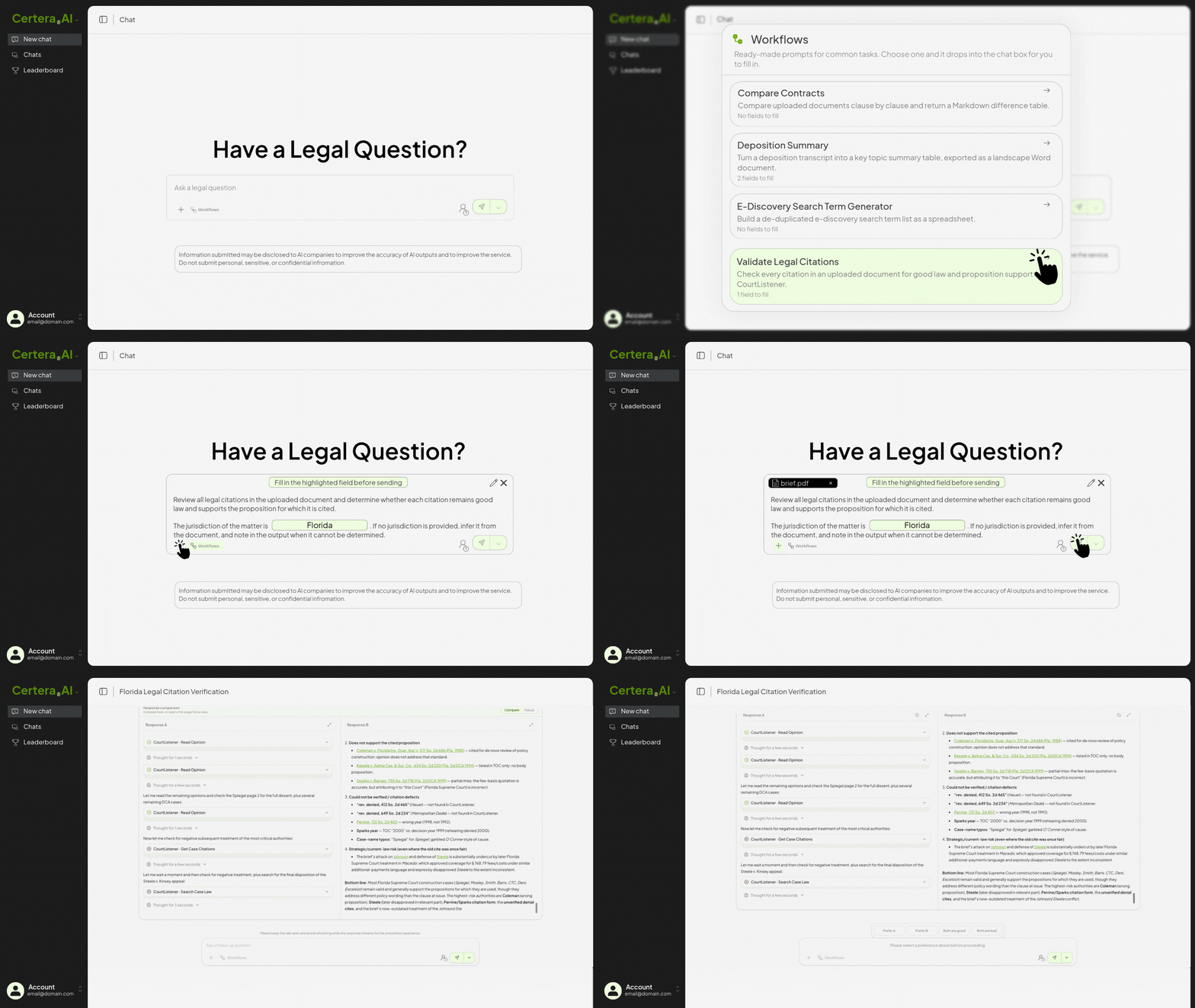
Despite being prewritten, all Certera workflows are editable and customizable to fit the needs of specific legal tasks. The off the shelf workflow is just a starting point based on frequently used legal AI prompts. If edited, users are ultimately judging AI models on the needs of their task.
What Legal Workflows Are Available on Certera.AI?
AI Deposition Summary Workflow
Upload a deposition transcript, identify the party from whose perspective the summary is to be drafted, list the claims at issue, and two models return a deposition summary as a Word document, organized by topic, with page and line cites for every entry.
Automated Legal Citation Validation Tool
Upload a legal pleading, brief or memo, identify the jurisdiction, and multiple models return a table ordered by page number detailing whether the authorities cited in the document are good law and whether they support the proposition for which they are cited. This workflow is built on our CourtListener integration.
Side by Side Contract Comparison
Upload two or more agreements and get back a clause-by-clause comparison table, one column per document, with a column explaining what the difference means.
Automate Discovery Responses and Objections
Upload a set of requests for production or interrogatories and Certera queries two models for tailored objections and response language, request by request. Evaluate the output against the discovery requests and determine which model is more thorough and whether the objections track the discovery requests.
Generate Law Firm Client Alerts Using AI
Upload a new decision, rule, or regulatory development and generate a client alert. The prompt is specifically designed to follow best practices for client alerts and draft a missive tailored to a client audience rather than opposing counsel or legal colleague.
What Workflow Should We Build Next?
The legal workflows offered in Certera to date are common tasks we know legal professionals use AI to automate. However, there are many more legal tasks ripe for automation.
We are adding workflows often. If there is a task you run into often enough that you would like to see in a workflow, let us know. The workflows are meant to reflect how legal work is actually done, and the fastest way there is hearing it from the people doing it.